
Cybereinforce Threat Enforcement
Device Code Attacks end at the browser.
A fake meeting invite, a real Microsoft sign-in page, and a code the victim types in themselves: that is all it takes to hand an attacker a signed-in Microsoft 365 session, with no password stolen and the victim's own MFA satisfied. Cybereinforce blocks that sign-in step in the browser, by default, for every organisation.
How a Device Code Attack happens
Nothing in this attack is fake except the story. Every page the victim signs in on is genuine Microsoft.
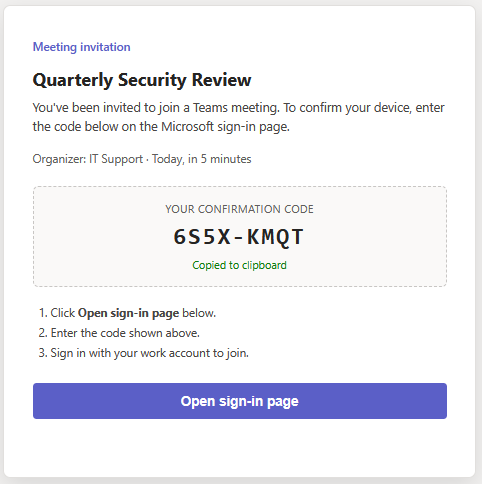
The lure
A message arrives by email, Teams chat, SMS or a QR code: a meeting invitation, a shared document, a security review. It comes with a short code and an instruction to "confirm your device".
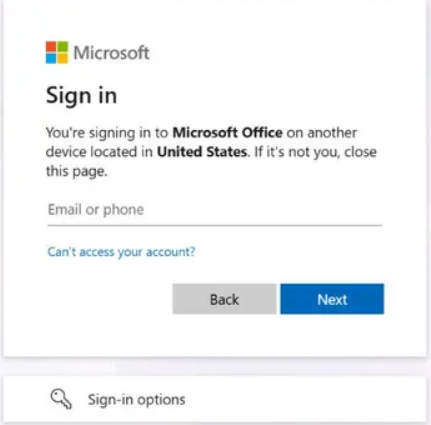
The real Microsoft page
The victim opens Microsoft's own device sign-in page and types the code. The address bar shows a real Microsoft domain, so every habit says it is safe.
The attacker is signed in
The code was generated by the attacker. When the victim finishes signing in and approves MFA, Microsoft issues the session tokens to the attacker, not to the victim's device.
Quiet persistence
With those tokens the attacker reads mail, Teams and SharePoint, and can register their own device in your tenant so that later activity looks like it comes from a known machine.
Why it is so hard for a SOC to see
Most attacks leave something that looks wrong. This one is built to look right, which is exactly what makes analysts trust it.
What the analyst sees in the sign-in logs
| Domain | login.microsoftonline.com |
| MFA | satisfied |
| Device ID | present |
| Device name | present |
| Device trust type | Azure AD registered |
Illustrative. Real values are tenant-specific.
Why that fools people
- The sign-in comes from a genuine Microsoft endpoint, with MFA completed by the real user.
- After the first compromise the attacker can register a device in your tenant. From then on their sessions carry a device ID, a device name and the trust type "Azure AD registered", the same markers as your own staff's laptops.
- There is no malware, no malicious attachment and no look-alike domain to find. Anomaly rules built around untrusted devices stay quiet.
- By the time it is understood, the attacker may have been reading mail for days.
Device code phishing is documented by Microsoft and by other security vendors as an active technique used by multiple threat actors, and it is easy to run at scale. Detecting it after the fact is hard. Preventing the step that makes it possible is not.
The Cybereinforce answer: stop the sign-in step
We do not try to out-guess the lure. Lures change every day. The device-code sign-in page does not.
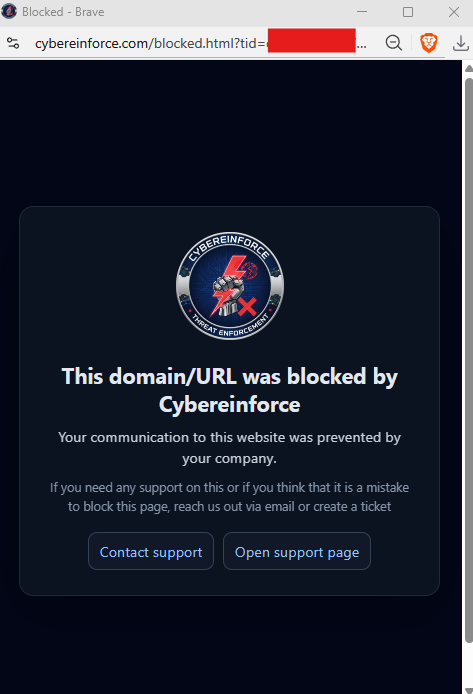
Every organisation, from day one
The device-code sign-in URL is blocked by the platform for every Cybereinforce customer. There is nothing to configure and no rule to remember to add.
It does not matter how the lure arrives
Email, Teams, SMS, QR code or a phone call: whichever way the victim reaches the sign-in page, the browser stops there.
Not a rule anyone can delete by accident
The protection is applied by the platform, it does not use up your rule allowance, and it reaches every organisation without any setup.
Look-alike sign-in pages
Pages that imitate the Microsoft device login on a different domain are caught by our brand-lookalike and phishing-lure detections, including newly registered domains.
Fake device-login pages
Pages that copy the device-login flow on look-alike domains are recognised by what they ask the victim to do, not only by where they are hosted.
You see every block
Blocked attempts are logged with the reason and available to your SOC, so a lure that reached your staff becomes a visible, investigable event.
Close the door on Device Code Attacks
Start a trial and see the block page for yourself, or talk to us about how it fits your Microsoft 365 environment.
Start Free Trial Threat Intelligence & Detections Contact us* Applies to browsers enrolled in Cybereinforce, where the device-code sign-in page is blocked by default. Organisations that rely on legitimate device-code sign-ins can permit them for their own organisation through the Whitelist. The Microsoft interface shown is an illustrative capture; the lure is a demonstration example, not a real message.